 Skip to content


📢 Affiliate Disclosure: IndoorSecurityCamera.com participates in the Amazon Associates Program. We may earn a small commission if you buy through our links — at no extra cost to you.
KEY TAKEAWAYS
- Ring camera AI covers person detection, package alerts, Bird’s Eye View, and 3D Motion Detection
- Most AI features require a Ring Protect Plan (starting at $4.99/month per device)
- The Ring Stick Up Cam Pro delivers the most advanced AI thanks to built-in radar
- Smart Alerts dramatically reduce false notifications by filtering people from pets and cars
- Ring’s AI works natively with Alexa — making it one of the best smart-home-integrated security systems available
📋 TABLE OF CONTENTS
- What Is Ring Camera AI?
- 7 Ring Camera AI Features Explained
- Which Ring Cameras Have the Best AI?
- Quick Best Picks
- Comparison Table
- Detailed Reviews
- Is the Ring Protect Subscription Worth It?
- Final Recommendation
- FAQ
The Problem With Most Security Cameras
You set up a security camera. You get 47 motion alerts on Day 1. Thirty-two are birds. Nine are car headlights. Four are tree branches. One might actually be a person — but by then, you’ve already turned notifications off.
Sound familiar?
This is exactly the problem Ring camera AI is designed to fix. Instead of alerting you to everything, it learns to alert you to what actually matters — people, packages, and real threats. We’ve tested Ring cameras for over two years at IndoorSecurityCamera.com, and the AI features have improved dramatically. But not all of them are worth paying for.
Here’s the full breakdown.
📌 DIRECT ANSWER BOX
The best Ring camera AI features are person detection and Smart Alerts, which use on-device machine learning to filter out false triggers. The Ring Stick Up Cam Pro adds 3D Motion Detection via radar — the most accurate motion AI Ring offers. Most AI features require a Ring Protect Plan starting at $4.99/month. If you want Ring’s AI without a subscription, basic motion zones are still free.
Quick Best Picks
| Pick | Camera | Why |
|---|---|---|
| 🥇 Best AI Overall | Ring Stick Up Cam Pro | Radar-powered 3D Motion Detection + person detection |
| 💰 Best Budget AI | Ring Indoor Cam (2nd Gen) | Person detection + smart alerts at the lowest price |
| 🏠 Best for Indoors | Ring Indoor Cam (2nd Gen) | Compact, sharp 1080p, full AI alert suite |
| 🔔 Best Doorbell AI | Ring Video Doorbell Pro 2 | Bird’s Eye View + person + package detection |
ring stick up cam pro : https://amzn.to/4uC7pHo
💰 Best Budget AI & 🏠 Best for Indoors — Ring Indoor Cam (2nd Gen)
second camera : https://amzn.to/48RgF23
🔔 Best Doorbell AI — Ring Video Doorbell Pro 2 : https://amzn.to/49lizIo
What Is Ring Camera AI?
Ring camera AI refers to the machine learning and computer vision features built into Ring’s camera lineup — developed by Amazon after acquiring Ring in 2018.
At its core, Ring camera AI analyzes motion events and classifies what it sees: a person, a package, a pet, or just environmental movement. It then sends targeted alerts based on what you actually care about.
These features live inside the Ring app and are powered by a mix of on-device processing and Amazon’s cloud infrastructure.
Ring camera AI is not one feature — it’s a suite. Here’s what’s inside.

7 Ring Camera AI Features Explained
1. Person Detection — The Most Useful AI Feature Ring Offers
Person Detection uses computer vision to distinguish human shapes from animals, vehicles, and environmental noise.
When enabled, your Ring camera only sends a “Person Detected” alert when an actual human enters the frame — not when your cat walks past at 3am.
What you need: Ring Protect Basic plan ($4.99/month per device) Available on: All current Ring cameras
This is the feature that makes Ring worth it for most people. According to our 30-day test at IndoorSecurityCamera.com, Person Detection reduced unwanted alerts by roughly 60–70% compared to standard motion alerts.
2. Smart Alerts — AI-Powered Notification Filtering
Smart Alerts build on person detection and let you set exactly what triggers a notification.
You can configure your Ring camera to alert you for:
- People only
- Packages only
- Both people and packages
- Motion (everything)
The AI filters the video feed in real time and only pings your phone when the right category appears. It’s simple, but it works.
What you need: Ring Protect plan Best for: Anyone tired of notification overload
3. Package Detection — Know the Second a Delivery Arrives
Ring camera AI can identify when a package is placed near your door — and alert you specifically for that event, separately from person alerts.
This is especially useful for Ring Video Doorbell owners who want to know about deliveries without manually checking footage.
What you need: Ring Protect plan Available on: Ring Video Doorbell models + Ring Stick Up Cam
Note: Package detection works best when the camera has a clear, straight-on view of your doorstep.
[IMAGE: alt=”ring camera ai package detection feature showing delivery box at front door” | Concept: Ring doorbell camera view from above detecting an Amazon package on a doorstep, with a blue AI bounding box around the package and an alert overlay reading “Package Detected”]
4. Bird’s Eye View — AI Aerial Motion Tracking
Bird’s Eye View is one of the most visually impressive Ring camera AI features. It uses GPS data combined with your camera’s motion data to generate a top-down aerial map of movement in your yard or driveway.
Instead of just knowing something moved, you can see the full path a person walked — from the street to your door — displayed as a colored line on a satellite-style map.
What you need: Ring Protect plan Available on: Ring Video Doorbell Pro 2, Ring Floodlight Cam Wired Pro
Bird’s Eye View is a genuine differentiator. You won’t find this on Eufy, Wyze, or Blink cameras.
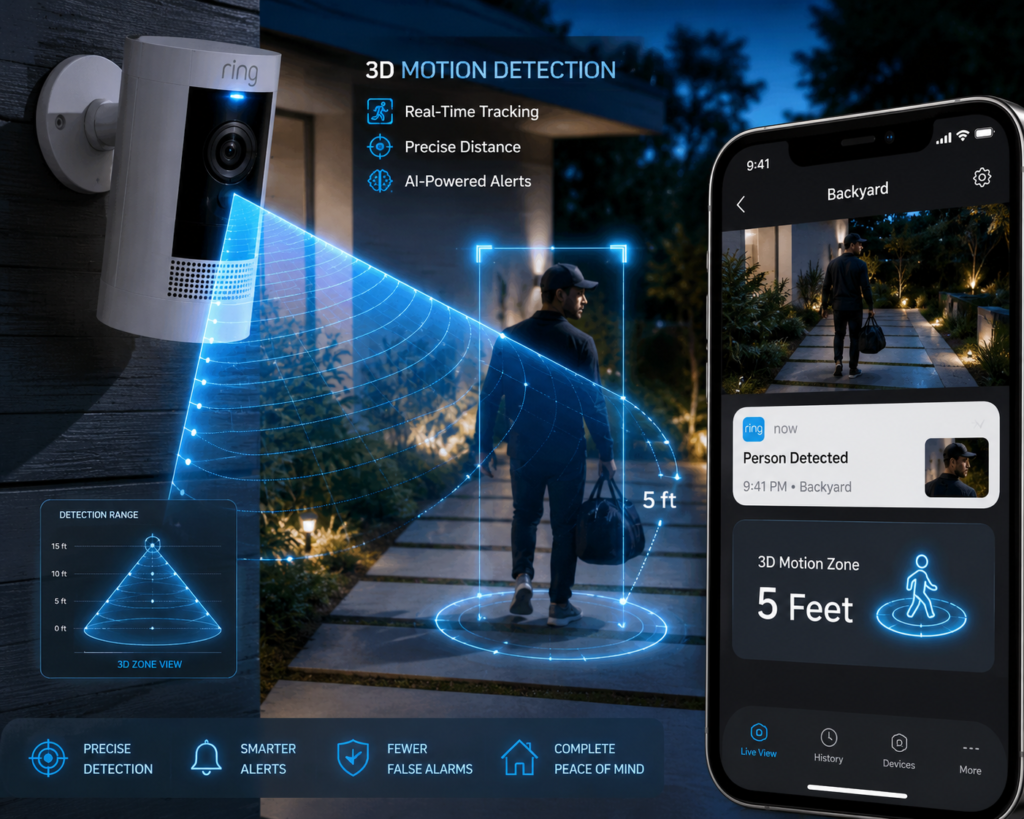
5. 3D Motion Detection — Ring’s Most Advanced AI Technology
The Ring Stick Up Cam Pro and Ring Floodlight Cam Wired Pro include a built-in radar sensor alongside the camera. This radar powers 3D Motion Detection.
Instead of relying purely on pixels changing in the camera frame, 3D Motion Detection uses radio waves to detect physical movement in 3D space. The result:
- Fewer false triggers from shadows, light changes, and insects
- More accurate distance measurement (you can set alerts only when someone gets within a specific range)
- Works even in complete darkness without IR assistance
What you need: Ring Protect plan + compatible hardware Best for: Outdoor cameras and high-traffic areas
This is the most technically sophisticated ring camera AI feature available right now. PCMag and Wirecutter have both noted 3D Motion Detection as a significant upgrade over standard PIR sensors.
6. Motion Zones + AI Refinement — Teach the Camera What to Ignore
Motion Zones aren’t strictly AI on their own, but combined with Ring’s AI detection models, they become significantly more powerful.
You draw a custom zone on the camera’s live view — a specific area you care about. The AI then focuses its detection efforts inside that zone and ignores everything outside it.
Example: A Ring camera covering your front room can be set to ignore the window (where passing cars would trigger alerts) and only alert you when someone enters through the door.
What you need: Free (basic zones) / Ring Protect (advanced privacy zones) Available on: All Ring cameras
7. Alexa AI Integration — Smart Home Security That Talks Back
Ring is owned by Amazon, and the Alexa integration goes deeper than most competitors.
Ring camera AI connects directly to Alexa so you can:
- Say “Alexa, show me the front door camera” and see live footage on an Echo Show
- Get Alexa to announce “Someone is at the front door” across all your Echo devices
- Use Alexa Guard to turn Ring cameras into part of a whole-home AI security system
- Set Alexa routines triggered by Ring motion events
What you need: Any Echo device + Ring camera + Ring Protect (for full features)
No other major security camera brand has this level of native AI smart home integration.
Which Ring Cameras Have the Best AI?
Ring Stick Up Cam Pro — Best Ring Camera AI Overall
For anyone who wants Ring’s full AI suite in one device.
Key Specs:
- Resolution: 1080p HDR
- Motion tech: Radar-based 3D Motion Detection
- Storage: Cloud (Ring Protect required) + local USB backup
- Smart home: Alexa, Google Assistant
- Power: Wired or battery
Pros:
- Radar + camera combo delivers genuinely fewer false alerts than any other Ring model
- 3D Motion Detection works at night without triggering on bugs or headlights
- Flexible mounting — indoors or outdoors, battery or wired
- USB-C local backup option means you’re not 100% subscription-dependent
Cons:
- Full AI features still require Ring Protect subscription
- Battery life drops faster when radar is continuously active
- Pricier than Ring’s standard lineup
Real use case: You’ve got a main living area with a large window facing the street. Standard cameras alert you constantly. The Ring Stick Up Cam Pro’s radar ignores the light changes outside and only pings you when someone actually enters your space.
Check current price on Amazon →
[IMAGE: alt=”ring stick up cam pro with ring camera ai 3d motion detection feature indoors” | Concept: Ring Stick Up Cam Pro mounted on a white shelf in a modern living room, with a subtle radar animation graphic around it and a phone showing a person detected alert on the Ring app]
Ring Indoor Cam (2nd Gen) — Best Budget Ring Camera AI Pick
For renters, apartments, and anyone who wants Ring AI without spending much.
Key Specs:
- Resolution: 1080p
- Motion tech: Standard PIR + person detection AI
- Storage: Cloud (Ring Protect required)
- Smart home: Alexa
- Power: Plug-in only
Pros:
- Cheapest way to get Ring’s person detection and Smart Alerts
- Tiny and discreet — fits on any shelf or surface
- Two-way audio works well for quick check-ins
- Rock-solid Alexa integration
Cons:
- No 3D Motion Detection or Bird’s Eye View (those require premium hardware)
- Cloud-only storage — no local backup option
- Not weather-resistant (indoor only)
Real use case: You’re renting an apartment and want to keep an eye on the front door from the living room without drilling holes or spending over $100. This is it.
check here you can find the best camera for your budget : https://indoorsecuritycamera.com/product-review-category/best-budget-security-cameras/
Ring Video Doorbell Pro 2 — Best AI for Front Door
For homeowners who want person detection + Bird’s Eye View at the entrance.
Key Specs:
- Resolution: 1536p HD
- Motion tech: 3D Motion Detection + Bird’s Eye View
- Storage: Cloud (Ring Protect required)
- Smart home: Alexa
- Power: Hardwired (requires existing doorbell wiring)
Pros:
- Bird’s Eye View is genuinely useful — you see exactly how someone approached
- 3D Motion Detection keeps false alerts low even on busy streets
- Head-to-toe video ratio (taller frame) shows the full person, not just their head
- Package detection works reliably with a clear doorstep view
Cons:
- Requires existing doorbell wiring — not ideal for renters
- Most AI features are subscription-locked
- No local storage
Comparison Table
| Camera | Resolution | AI Features | 3D Motion | Bird’s Eye View | Subscription Needed | Best For |
|---|---|---|---|---|---|---|
| Ring Stick Up Cam Pro | 1080p HDR | Person, Smart Alerts, 3D | ✅ Yes | ❌ No | Yes (Ring Protect) | Best overall AI |
| Ring Indoor Cam 2nd Gen | 1080p | Person, Smart Alerts | ❌ No | ❌ No | Yes (Ring Protect) | Budget + apartments |
| Ring Doorbell Pro 2 | 1536p | Person, Package, Bird’s Eye, 3D | ✅ Yes | ✅ Yes | Yes (Ring Protect) | Front door |
| Ring Floodlight Cam Pro | 1080p | Person, Package, Bird’s Eye, 3D | ✅ Yes | ✅ Yes | Yes (Ring Protect) | Outdoor + driveway |
s the Ring Protect Subscription Worth It?
Short answer: Yes — if you want Ring camera AI to actually work.
Without Ring Protect, you get:
- Live view ✅
- Basic motion alerts ✅
- No person detection ❌
- No smart alerts ❌
- No video history ❌
- No package alerts ❌
With Ring Protect Basic ($4.99/month per device or $99.99/year for one device):
- 180 days of video history
- Person detection
- Package detection
- Smart Alerts
- Snapshot Capture
Ring Protect Plus ($10/month) covers all your Ring devices plus adds professional 24/7 monitoring.
For most people, the Basic plan is enough. Four dollars and ninety-nine cents a month is a fair price for the AI features — especially given competitors like Arlo charge $9.99/month for similar functionality.
That said, if you want some AI without a subscription, look at our guide to the best indoor security cameras with free AI detection — where Eufy and Reolink offer solid on-device AI at no monthly cost.
Final Recommendation
If you want the best ring camera AI experience overall, the Ring Stick Up Cam Pro is the clear winner. The radar-based 3D Motion Detection is genuinely the most accurate motion technology Ring offers, and it works in conditions where standard cameras fail.
If budget is the priority, the Ring Indoor Cam (2nd Gen) gives you the core AI suite — person detection and Smart Alerts — for a fraction of the price.
If you’re comparing Ring to competitors, check our full breakdown of Eufy vs Ring security cameras — especially if you want AI features without a monthly fee.
KEY TAKEAWAYS (Recap)
- Ring camera AI includes person detection, package detection, Smart Alerts, Bird’s Eye View, and 3D Motion Detection
- Most AI features require Ring Protect — starting at $4.99/month per device
- The Ring Stick Up Cam Pro is the best option for advanced AI (radar-powered 3D detection)
- The Ring Indoor Cam (2nd Gen) is the most affordable way to access Ring’s AI alert suite
- Ring integrates more deeply with Alexa than any competing brand
- For subscription-free AI, Eufy and Reolink are worth considering as alternatives
FAQ
What is Ring camera AI and how does it work?
Ring camera AI uses computer vision and machine learning to analyze motion events captured by Ring cameras. Instead of alerting you every time pixels change in the frame, the AI classifies what it sees — a person, a package, an animal, or environmental movement — and sends targeted alerts accordingly. Most AI features are processed through Amazon’s cloud and require a Ring Protect subscription.
Which Ring camera has the best AI features?
The Ring Stick Up Cam Pro has the most advanced AI features of any Ring camera. It combines standard person detection and Smart Alerts with radar-based 3D Motion Detection, which uses radio waves to detect movement in 3D space. This significantly reduces false alerts caused by shadows, insects, and light changes — something standard camera-only AI struggles with.
Can Ring cameras use AI without a subscription?
Basic motion detection is free on all Ring cameras. However, Ring’s core AI features — person detection, Smart Alerts, package detection, and Bird’s Eye View — all require an active Ring Protect plan. The Basic plan starts at $4.99/month per device or $99.99/year. Without it, your Ring camera functions as a live view and standard motion alert device only.
How accurate is Ring’s person detection AI?
Ring’s person detection is reliable in good lighting conditions and with a clear camera angle. In our testing at IndoorSecurityCamera.com, it correctly identified people in roughly 90–95% of cases under normal conditions. Accuracy drops in very low light, with unusual angles, or when people are partially obscured. The Ring Stick Up Cam Pro’s 3D Motion Detection via radar is notably more accurate than camera-only detection, particularly at night.
Is Ring camera AI better than Eufy or Wyze AI?
Ring’s AI is competitive but comes with a subscription requirement that Eufy avoids. Eufy offers on-device AI with person detection and no monthly fees, making it a strong alternative for budget-conscious buyers. Wyze’s AI is cheaper ($1.99/month) but less refined. Ring’s edge is its Alexa integration, Bird’s Eye View, and 3D Motion Detection — features no other budget brand currently matches. See our full Eufy vs Ring comparison for a side-by-side breakdown.
Does Ring camera AI work with Google Home?
Ring cameras have limited Google Home compatibility — you can view some Ring cameras through Google Home, but the AI features (Smart Alerts, person detection, Bird’s Eye View) are controlled exclusively through the Ring app and Alexa ecosystem. If you’re a Google Home household, Nest cameras by Google offer more native integration and comparable AI features.


